XcodeGen: Xcode Projects from YAML, for Coding Agents (2026)
XcodeGen is a free, open-source command-line tool that generates an Xcode project from a YAML file, project.yml, and your folder structure. For a coding agent like Claude Code, Codex or Cursor, that changes what it has to edit. In the run below, the agent wrote a 58-line project.yml instead of the 493-line project.pbxproj it generates, a file of 24-character IDs and cross-references that’s easy to break by hand. You stop committing the .xcodeproj and regenerate it when you build.
I tested this on October 26, 2026. Claude Code ran on a Linux machine with no Mac and no Xcode, in an empty folder. It wrote a small SwiftUI app as a project.yml plus five Swift files, and the app built, passed all 4 of its tests and took a screenshot on the first try. The Mac-side work was billed 1 minute, $0.05. Disclosure: I make macbox, the cloud Mac it built on. The XcodeGen advice works the same on your own Mac.
What XcodeGen is
XcodeGen is “a command line tool written in Swift that generates your Xcode project using your folder structure and a project spec” (README). The spec is YAML or JSON and describes your targets, build settings, schemes and dependencies. It reads the source folders you point it at, so new files are picked up the next time you generate.
- Latest release: 2.46.0, from July 16, 2026. MIT license, about 8,900 GitHub stars.
- Install on a Mac:
brew install xcodegen, ormint install yonaskolb/xcodegen. The README says to install the latest stable Xcode first. - Run it:
xcodegen generatein the folder withproject.yml. It writesYourApp.xcodeproj, including the shared schemes.
The smallest spec is one app target. This one built on the Mac in 8 seconds:
name: MyApp
options:
  bundleIdPrefix: com.example
  deploymentTarget:
    iOS: "17.0"
targets:
  MyApp:
    type: application
    platform: iOS
    sources: [MyApp]
    settings:
      base:
        GENERATE_INFOPLIST_FILE: YES
Put your Swift files in a MyApp folder next to it and run xcodegen generate. The 58-line spec further down adds a unit-test target, a UI-test target and a scheme that runs both.
Avoiding merge conflicts in project.pbxproj is one common reason teams adopt it. For agents, the bigger win is the file the agent doesn’t have to touch.
Why agents and project.pbxproj don’t mix
Here’s what one Swift file looks like inside a generated project.pbxproj. This is Counter.swift from the run below, which appears in four places:
FE3F5303E1E754E4744F5687 /* Counter.swift in Sources */ = {isa = PBXBuildFile; fileRef = BB9570BC0828D70F71FC9128 /* Counter.swift */; };
BB9570BC0828D70F71FC9128 /* Counter.swift */ = {isa = PBXFileReference; lastKnownFileType = sourcecode.swift; path = Counter.swift; sourceTree = "<group>"; };
				BB9570BC0828D70F71FC9128 /* Counter.swift */,
				FE3F5303E1E754E4744F5687 /* Counter.swift in Sources */,
For an agent to add a file by hand, it has to invent two new IDs and add matching entries in the build files, the file references, the right group and the right target’s build phase. Miss one, and the file sits in the folder but isn’t compiled, or the project stops opening. The whole file for this five-file app was 493 lines. The project.yml that produced it was 58.
Xcode 16 made part of this easier. Its synchronized folders, also called buildable folders, reference a whole directory, so adding or removing an ordinary file usually doesn’t touch the project file (how they work in the .pbxproj). That covers the add-a-file case if your project already uses them. New targets, test bundles, schemes and build settings are still project configuration, and an agent on Linux can’t open Xcode to change them. XcodeGen covers those too, and it can emit synchronized folders as well: a syncedFolder source type, for project format xcode16_0 and later, per the project spec.
The project.yml the agent wrote
I gave Claude Code one prompt: make a SwiftUI app called Tally (a number, a “+1” button and a “Reset” button), define it with XcodeGen, add a unit-test target and a UI-test target that taps +1 twice and checks the label says 2, target iOS 17, and don’t create an .xcodeproj. This is the file it wrote, unedited:
name: Tally
options:
  bundleIdPrefix: com.example
  deploymentTarget:
    iOS: "17.0"
settings:
  base:
    SWIFT_VERSION: "5.0"
    CODE_SIGNING_ALLOWED: "NO"
targets:
  Tally:
    type: application
    platform: iOS
    sources: [Tally]
    settings:
      base:
        PRODUCT_BUNDLE_IDENTIFIER: com.example.Tally
        GENERATE_INFOPLIST_FILE: YES
        INFOPLIST_KEY_UILaunchScreen_Generation: YES
        INFOPLIST_KEY_UIApplicationSceneManifest_Generation: YES
        TARGETED_DEVICE_FAMILY: "1"
  TallyTests:
    type: bundle.unit-test
    platform: iOS
    sources: [TallyTests]
    dependencies:
      - target: Tally
    settings:
      base:
        PRODUCT_BUNDLE_IDENTIFIER: com.example.TallyTests
        GENERATE_INFOPLIST_FILE: YES
        TEST_HOST: "$(BUILT_PRODUCTS_DIR)/Tally.app/Tally"
        BUNDLE_LOADER: "$(TEST_HOST)"
  TallyUITests:
    type: bundle.ui-testing
    platform: iOS
    sources: [TallyUITests]
    dependencies:
      - target: Tally
    settings:
      base:
        PRODUCT_BUNDLE_IDENTIFIER: com.example.TallyUITests
        GENERATE_INFOPLIST_FILE: YES
        TEST_TARGET_NAME: Tally
schemes:
  Tally:
    build:
      targets:
        Tally: all
        TallyTests: [test]
        TallyUITests: [test]
    run:
      config: Debug
    test:
      config: Debug
      targets:
        - TallyTests
        - TallyUITests
The agent also wrote a .gitignore with *.xcodeproj/ without being asked, so the generated project is never committed.
The run: from an empty folder to passing tests
The agent then ran three commands through macbox, which sends the folder to a Mac, runs XcodeGen there, and builds with Xcode. The first build:
$ npx -y macbox build
macbox: Sending 7 files (4 KB) from <project>
...
macbox: Synced 7 changed of 7 files
macbox: Generating the Xcode project with XcodeGen
macbox: Building Tally for the simulator
...
Build Succeeded
macbox: build succeeded in 33s (under a minute, not billed). Job e44b5ca32dc2263d.
Then the tests:
$ npx -y macbox test
...
macbox: Generating the Xcode project with XcodeGen
macbox: Testing Tally
PASS TallyTests.CounterTests testIncrementAddsOne (0.00s)
PASS TallyTests.CounterTests testResetReturnsToZero (0.00s)
PASS TallyTests.CounterTests testStartsAtZero (0.00s)
PASS TallyUITests.TallyUITests testTappingPlusOneTwiceShowsTwo (14.31s)
macbox: test succeeded in 1m39s (billed 1 minute, 4 tests passed). Job 6e42b1269e8628a3.
And a screenshot, which took 49 seconds and wasn’t billed:
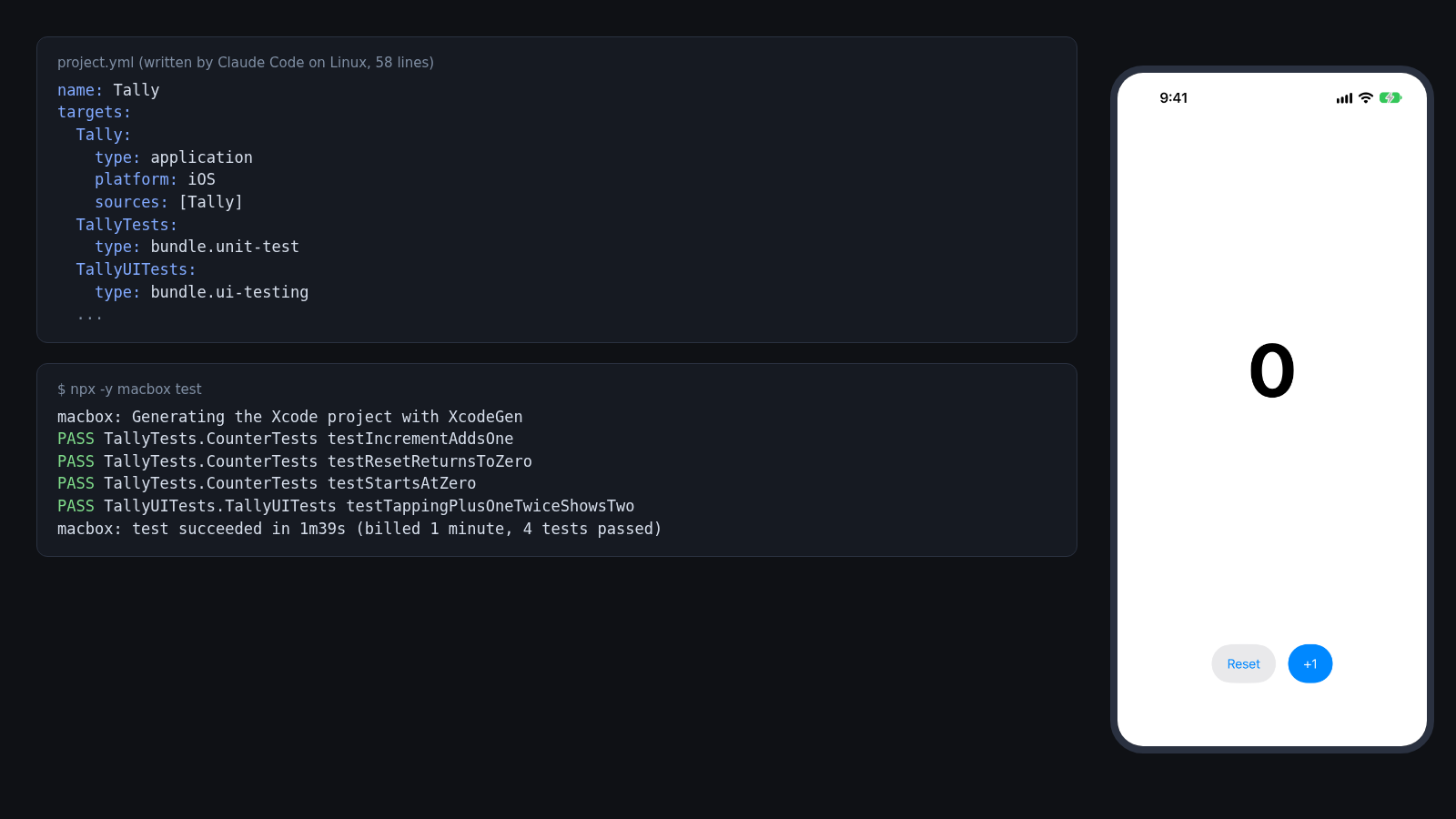
From prompt to screenshot took 3 minutes 49 seconds, including the agent writing the code. It used 3 of the 8 macbox commands I allowed and didn’t need to fix anything. The account’s balance went from $9.70 to $9.65.
macbox regenerates the Xcode project with XcodeGen before each build, so in this run the agent only edited project.yml, the Swift files and .gitignore, never the project. And the test output is one PASS or FAIL line per test, which is easy for an agent to act on.
A caveat: a single small app passing first time doesn’t mean every spec will. If generation or a build fails, the agent gets the error and has to fix whatever caused it: the spec, the code, or something else.
Common XcodeGen gotchas
- Regenerate after adding or deleting files. For ordinary source folders, XcodeGen reads them when it runs, so a new file isn’t in the project until you run
xcodegen generateagain. (macbox does this before each build.)syncedFoldersources usually pick up added and removed files without regenerating. - Ignore the generated project. Add
*.xcodeproj/to.gitignore. If you commit it, you’re back to merge conflicts in a file nobody edits by hand. - Let Xcode generate the Info.plist.
GENERATE_INFOPLIST_FILE: YES, withINFOPLIST_KEY_...settings for the values you need, means there’s noInfo.plistto write or keep in sync. If you keep your own, set the target’sINFOPLIST_FILEbuild setting to its path. Don’t use theinfoproperty for that: it generates and writes anInfo.plistat the path you give it. - Signing.
CODE_SIGNING_ALLOWED: "NO"is fine for the simulator, which is all this app was built for. A device or TestFlight build needs real signing settings. - Schemes. The explicit
schemesblock puts both test bundles in Tally’s test scheme, soxcodebuild test -scheme Tallyruns them. XcodeGen can also build a scheme from settings on the target itself; either way, check that your tests are in the scheme the agent runs. - Synchronized folders and the project format.
syncedFoldersources needprojectFormatxcode16_0or later. That’s the default, so this only bites if your spec pins an older format underoptions.
Running XcodeGen on Linux
XcodeGen itself can run on Linux. Its changelog added “support for building and running on Linux platforms”, and its CI has a Linux job. That’s useful for an agent on Linux: it can generate the project before sending anything to a Mac. For this test I built XcodeGen from source with Swift. This is the Docker command I used, run in the folder with project.yml:
docker run --rm -e USER=root -v "$PWD":/p swift:6.2 bash -c '
  git clone -q --depth 1 --branch 2.46.0 https://github.com/yonaskolb/XcodeGen.git /xg &&
  cd /xg && swift build -c release &&
  cd /p && /xg/.build/release/xcodegen generate'
The build takes about a minute and a half. What I found:
- Swift 6.2.4 works. It wrote
Tally.xcodeprojwith the 493-line project file and the shared scheme. I then sent that Linux-generated project to the Mac with noproject.yml, and it built in 31 seconds. - Swift 6.1 doesn’t, in my test. XcodeGen built, and
xcodegen dump --type summaryprinted the targets and scheme correctly, butxcodegen generatecrashed with a segmentation fault. - Swift 5.10 can’t build 2.46.0. Its XcodeProj dependency needs Swift 6.
- Set
USERin a container. In the Swift 6.1 container, with noUSERvariable,generatestopped with “Couldn’t find current username”. - Run the binary where you built it. XcodeGen looks for its built-in setting presets next to the binary or in the source checkout. When I ran the same binary from a different path, it printed
No "base" settings foundand wrote a project without its default settings. When I copied it to/usr/local/binwith the presets in/usr/local/share/xcodegen,generatecrashed. Running it from the checkout, as in the command above, worked every time.
Linux can’t run xcodebuild, so on Linux alone you can only check that XcodeGen generates a project. You still need a Mac to find out whether it builds.
XcodeGen vs Tuist vs synchronized folders
| XcodeGen | Tuist | Xcode 16 synchronized folders | |
|---|---|---|---|
| What the agent edits | A YAML or JSON spec (project.yml here) |
Project.swift manifests (Swift) |
Source files for routine additions; project configuration for targets, schemes and settings |
Commit the .xcodeproj? |
No, generate it | No, generate it | Yes |
| Generates on Linux | Yes, with Swift 6.2.4 in my test | No: “Commands that depend on Xcode (such as tuist generate) are not available on Linux” (Tuist docs) |
Changing targets means editing project configuration |
| Scope | Project generation only; Tuist’s docs call it “a tool that generates Xcode projects, not a project manager” | A wider toolset beyond generation (Tuist docs) | Built into Xcode |
| Good for | Teams that like a YAML or JSON spec, including agents editing from Linux | Teams that want Swift manifests and Tuist’s extra tooling | Teams that work in Xcode on a Mac |
If your project already uses Tuist, keep it. An agent can edit Tuist’s Swift manifests from anywhere, but tuist generate has to run on a Mac with Tuist installed, and I didn’t test that setup with macbox. For a new app an agent starts on Linux, XcodeGen is the simpler fit: the spec is short, and the project can be generated on Linux or on the Mac.
Tell your agent to use it
Put this in your CLAUDE.md or AGENTS.md so the agent doesn’t go back to editing the project file:
## Xcode project
- The Xcode project is generated by XcodeGen from project.yml. Never edit *.xcodeproj or project.pbxproj.
- To add a file: put it in the right source folder. To add a target, scheme or build setting: edit project.yml.
- *.xcodeproj is in .gitignore. Run `xcodegen generate` after changing project.yml (macbox build does this for you).
- If generation or the build fails, fix project.yml or the code; don't patch the generated project.
If you have an existing app with a hand-made project, converting it takes some work: you write project.yml to match your current targets and settings, then compare a build from the generated project with the old one. An agent can draft the spec, but check the signing, build phases and settings yourself before you delete the old project.
To try the same loop: run npx -y macbox build in a folder with a project.yml. New accounts get $10 of credit, about 200 Mac minutes.
FAQ
Is XcodeGen still maintained?
Yes. 2.46.0 came out on July 16, 2026, and the repository had new commits in October 2026.
Do I need a Mac to use XcodeGen?
To generate the project, no. XcodeGen builds and runs on Linux (with Swift 6.2.4 in my test). To build or run the app, yes: Xcode only runs on macOS, so you need a Mac of your own, a CI service, or a cloud Mac.
Should I commit the .xcodeproj?
No. Commit project.yml and your sources, and add *.xcodeproj/ to .gitignore. Anyone who clones the repo runs xcodegen generate.
Does it work with Swift packages and CocoaPods?
Yes. project.yml has a packages section for Swift packages, and you can run pod install after generating. macbox handles XcodeGen, Swift packages and CocoaPods on its Mac.
What does macbox cost for this?
$0.05 per Mac minute, whole minutes only, so builds under a minute are free. This whole run was billed 1 minute. macbox builds and tests iOS apps on the simulator, and unsigned Mac apps; it doesn’t do code signing, TestFlight or physical devices yet.
More guides
Claude Code for iOS without a Mac covers the full agent loop. iOS builds from cloud agents covers Claude Code on the web, Codex cloud and Cursor.