iOS Simulator Online: Run Your App in a Browser, With or Without a Mac (2026)
An online iOS simulator is Apple’s iOS Simulator running on a Mac in someone’s data center, streamed to your browser. Nothing runs iOS inside a browser tab itself. If you already have a simulator build of your app (a .app file), Appetize.io is the quickest way to put it in a browser: 30 free minutes a month, then $59 a month. If you don’t have a Mac to make that build, you need a service that builds from your source code on its own Macs first: macbox, NoMac or Limrun for native iOS apps, or Expo’s EAS Build for Expo and React Native apps.
I checked every price and doc below on October 25, 2026, and ran my own app in a browser from a Linux machine. Disclosure: I make macbox, one of the build-from-source options. If you already have a .app, you don’t need it.
The catch: most online simulators need an app built on a Mac
Search “ios simulator online” and most results list streaming services as if you could just open one and run your app. Read their upload docs and almost all of them want a finished build:
- Appetize.io: “Appetize requires a .zip or .tar.gz file containing your compressed .app bundle.” It also says “AppStore distribution device builds (.ipa) are not currently supported.” Its docs tell you to make the
.appin Xcode, or withxcodebuild -sdk iphonesimulator. - Sauce Labs: “For iOS Simulator testing, .zip files must contain a valid .app bundle.”
- AWS Device Farm: the file must be an
.ipa“built for an iOS device and not for a simulator”. AWS re-signs it for its own phones. - BrowserStack App Live: you upload an
.ipato run on its real iPhones.
Xcode and xcodebuild only run on macOS. So if the reason you’re searching is that you don’t have a Mac, these services skip the step you’re stuck on. Someone on the B4X forum ran into this back in 2016: “Appetize requires a simulator build and without local mac builder it’s not possible to create such a build, or is there a workaround?” Today a cloud build service can make that file for you, but a Mac still has to build it somewhere.
There’s a second catch: sites that claim to run iOS in your browser with no Apple hardware at all. They show a skin that looks like an iPhone. They can’t run your app, and some push downloads you shouldn’t install.
Three kinds of online iOS simulator
| Kind | You upload | Needs a Mac to prepare? | Examples |
|---|---|---|---|
| Streaming simulator | A simulator .app (zipped) |
Yes | Appetize.io, Sauce Labs, TestMu AI (formerly LambdaTest) |
| Real-device cloud | A device .ipa |
Yes | BrowserStack App Live, AWS Device Farm, Sauce Labs |
| Builds from source | Your project folder | No | macbox, NoMac, Limrun; Expo EAS Build for Expo apps |
Prices, checked October 25, 2026
| Service | Free | Cheapest paid | Builds from source? |
|---|---|---|---|
| Appetize.io | 30 minutes a month, 3-minute sessions | $59/month billed yearly ($708), 500 minutes, then $0.06/min | No |
| TestMu AI (LambdaTest) | 5 real-device sessions a month, 2 minutes each | Virtual Live $15/month billed yearly; Real Device Plus Live $39 | No |
| Sauce Labs | Trial | Live Testing $39/month billed yearly, $49 month to month | No |
| AWS Device Farm | One-time trial of 1,000 device minutes (limited-time offer) | $0.17 per device minute | No (real devices only) |
| BrowserStack App Live | Trial | Freelancer $12.50/month billed yearly (100 minutes); Individual $39/month billed yearly | No (real devices) |
| macbox | $10 credit for new accounts | $0.05 per Mac minute, whole minutes only | Yes (native iOS) |
| NoMac | None | $0.80/hour, billed per minute, $10 minimum top-up | Yes (full cloud Mac) |
| Limrun | One-time credits | Entry plan $20/month; simulator time $0.08/min from the plan’s credits, Xcode builds billed separately | Yes |
| Expo Simulators | Limited preview, waitlist | Not in current plans | No: runs a simulator build, which EAS Build can make for Expo apps |
Which one to use
You have a Mac and want to share or demo the app in a browser: Appetize.io. Build once, upload the zip, send a link. It was made for this, and the free tier covers a quick demo.
You need to test on real iPhones: BrowserStack App Live, Sauce Labs or AWS Device Farm. A simulator isn’t a phone, so camera, push notifications and performance need real hardware. You’ll need a device build of the app (an .ipa).
You don’t have a Mac and wrote the app in Swift: a service that builds from source. macbox and Limrun build your project and stream the simulator; NoMac gives you a whole Mac desktop in the browser with Xcode installed, which also suits you if you want to click around in Xcode yourself.
Your app is Expo or React Native: EAS Build can make the iOS simulator build in the cloud from Windows or Linux. Expo also has a browser simulator, Expo Simulators, but it’s a limited-access preview with a waitlist as I write this. Once you have the build, Appetize can run it too.
What it looks like: my app in a browser, built from Linux
This is a real run on October 25, 2026, from an Ubuntu machine with no Mac, using a small SwiftUI sample app. One command builds the app on a Mac, launches it in the iOS Simulator and prints a link:
$ npx -y macbox run
...
Build Succeeded
macbox: the app is running (1m34s). Job 36dc94dabe0f0434.
macbox: watch and drive it: https://…   (link removed)
macbox: next: macbox ui describe, then ui tap / type / swipe / screen. macbox stop ends it.
I opened the link in an ordinary browser. The page shows the simulator screen with “Click to tap. Drag to swipe. Type below and press Enter.”, a box to type into the app, a Home button, and a “What the agent sees” button that lists everything on screen. I clicked the button in the app and it answered in under a second: “Tap at (201.0, 481.0) completed successfully”, and the label changed to “Tapped 1 times”.
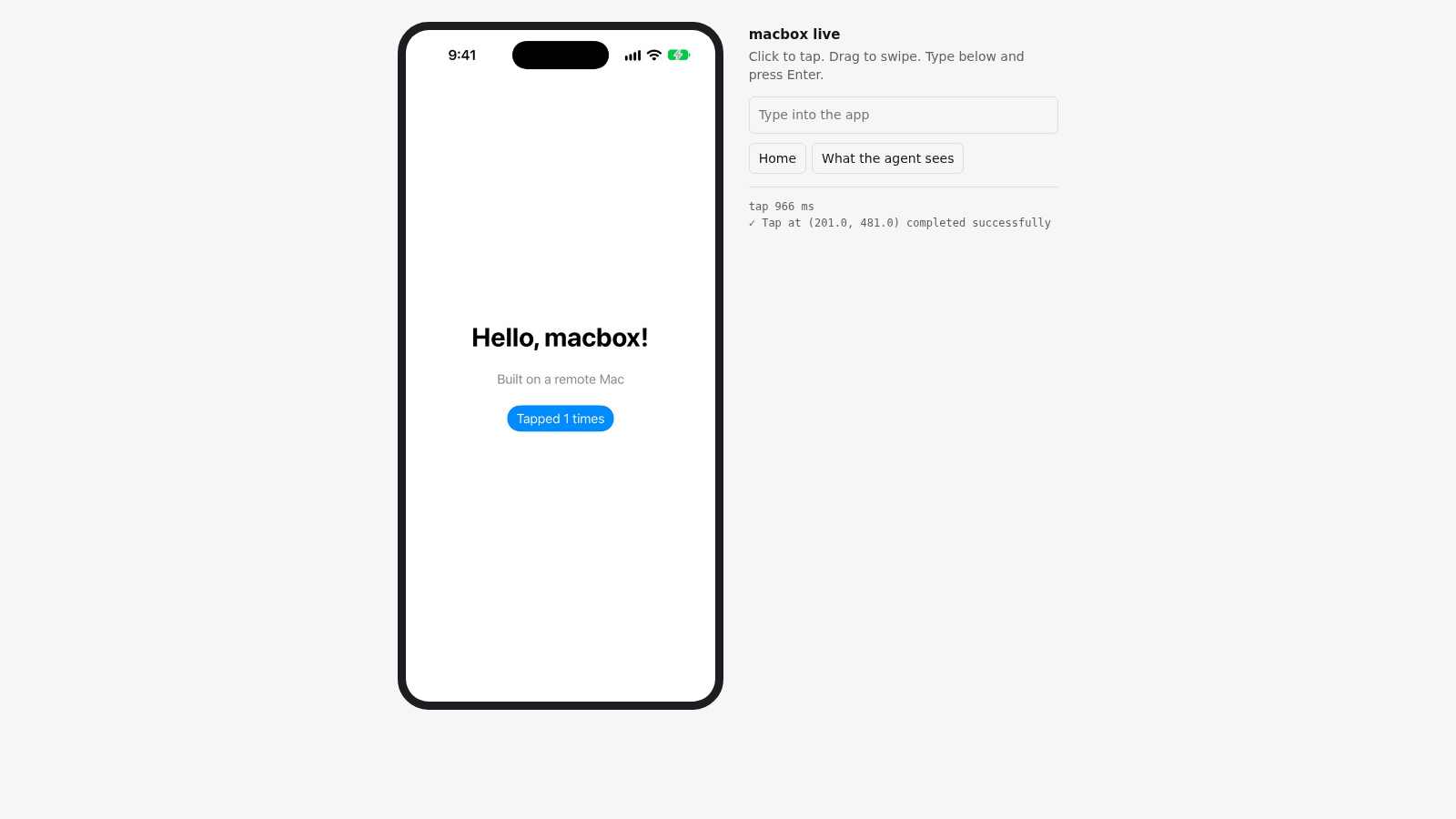
From the command to a working simulator took 1 minute 34 seconds, including the build. The whole session, including the build, was billed 1 minute: $0.05.
The same session can be driven by a coding agent (Claude Code, Codex, Cursor) with macbox ui describe and macbox ui tap, which is what macbox is mainly for. You can watch the agent and take over with the mouse.
Limits I’d want to know: a session ends when you run macbox stop, after 10 minutes with nobody using or watching it, or at the 30-minute job limit. macbox runs native iOS apps (Xcode projects, workspaces, Swift packages, CocoaPods, XcodeGen) on the simulator only. It doesn’t do code signing, real devices, React Native, Flutter or Expo yet.
FAQ
Is there a free online iOS simulator?
Appetize.io has a free tier: 30 minutes a month in 3-minute sessions, but you need a simulator build of your app to upload. macbox gives new accounts $10 of credit, about 200 Mac minutes, and builds from source. Sites that promise a free iPhone in your browser with nothing to upload are skins, not simulators.
Can I run the iOS Simulator in a browser without a Mac?
Yes, if the service builds your app for you: macbox, NoMac and Limrun build native iOS projects on their Macs and stream the simulator to your browser. For Expo apps, EAS Build makes the simulator build in the cloud and a streaming service can run it. Services that only accept a .app or .ipa still need a Mac somewhere to make the file.
What file does Appetize need?
A zipped simulator .app bundle (.zip or .tar.gz). It doesn’t accept App Store .ipa builds. You make the .app in Xcode, from the Debug-iphonesimulator build folder, or with xcodebuild -sdk iphonesimulator.
Is an online iOS emulator safe to download?
Real online simulators don’t need a download; they run in the browser. Desktop programs that claim to emulate iOS on Windows don’t run real iOS apps, and some come with adware. Don’t install them.
Simulator or real device?
A simulator is fine for layout, navigation and most logic, and it’s much cheaper. Use a real device cloud for the camera, push notifications, performance, and anything hardware-specific.
More guides
If you’re building without a Mac, see Xcode on Windows, renting a Mac by the minute, day or month, and iOS builds from cloud agents.